Best AI Tools for Content Creators in 2026: The Complete Workflow Stack
(更新: )
The best AI tools for content creators in 2026 cover the full production workflow: Copy.ai for scripting and marketing copy, ElevenLabs for realistic voiceover and narration, and Synthesia for avatar-based video without a camera. Supporting tools — ChatGPT for ideation, Canva for design, Descript for editing, and Opus Clip for repurposing — fill out a professional pipeline that covers every stage from blank page to published content.
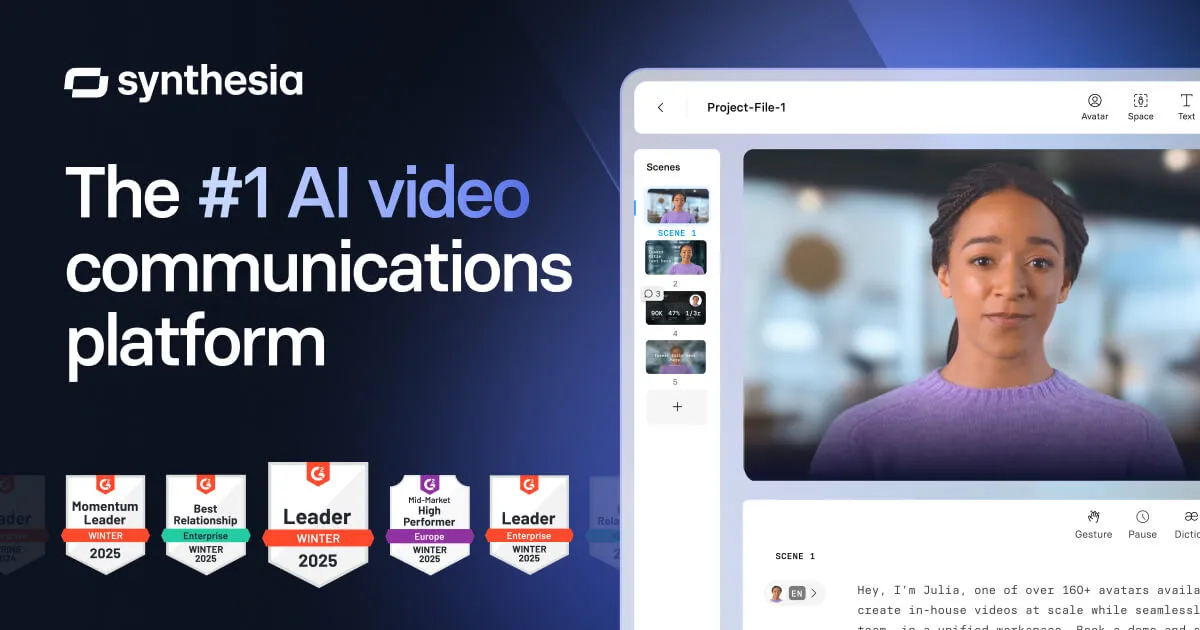
Source: Synthesia official site (synthesia.io)
Bottom line (up front): For scripting and copy → Copy.ai. For voiceover and narration → ElevenLabs. For avatar-based video → Synthesia. For thumbnails and graphics → Canva. For transcript-based video editing → Descript. For repurposing long-form into clips → Opus Clip. Most working creators run a five-to-seven tool stack that matches their specific format.
What AI tools do YouTubers use?
The answer varies significantly by channel format. Faceless educational channels rely most heavily on ElevenLabs for narration and Midjourney or Canva for visuals, with ChatGPT or Copy.ai for scripting. Talking-head channels use Descript for transcript-based editing and CapCut for quick social cuts. Presenter-style explainer channels — especially those producing in multiple languages — are adopting Synthesia to deliver the same script in 140+ languages without re-filming. The common thread is that AI has entered every stage of the YouTube production process; the question is which stage you want to accelerate first.
The content creator workflow: which AI tool fits each stage
| Workflow stage | Primary AI tool | Supporting alternatives |
|---|---|---|
| Ideation and research | ChatGPT, Perplexity | Notion AI |
| Scripting and copy | Copy.ai | ChatGPT, Jasper |
| Voiceover and narration | ElevenLabs | Murf AI, Play.ht |
| Avatar-based video | Synthesia | HeyGen |
| Thumbnail and graphics | Canva (AI features) | Midjourney |
| Video editing (recorded footage) | Descript | CapCut |
| Repurposing to short-form | Opus Clip | Pictory |
| Scheduling and distribution | Notion, Buffer | n/a |
Tool recommendations based on publicly available product information as of June 2026. Verify current features and pricing on each vendor’s site.
Stage 1: Ideation and scripting
Every content piece starts with an idea and a script. This is where AI delivers the clearest ROI — a good script that would take two hours to write from scratch can be drafted in 20 minutes with the right tool.
ChatGPT and Perplexity are the default starting points for ideation: topic brainstorming, angle identification, competitor content analysis, and first-pass outlines. Neither is a dedicated content tool; they are general-purpose assistants that work well for unstructured exploration.
Notion AI integrates idea capture directly into your notes workflow. If you already use Notion for content calendars, meeting notes, and drafts, the embedded AI is useful for summarizing, expanding, and reorganizing within the same tool — no context switching required.
Stage 2: Writing and marketing copy
Copy.ai: the scripting and copy engine for serious creators
Copy.ai has evolved from a simple headline generator into a full go-to-market content platform. For content creators specifically, the most relevant capabilities are script generation, video description copy, email newsletter drafts, social post variations, and workflow automation that chains these tasks together.
The Workflows feature (paid plans) is the biggest differentiator for creators producing at volume: you can build automated pipelines that generate a YouTube description, a LinkedIn post, a Twitter/X thread, and an email newsletter excerpt from a single script input — without manual copy-paste between tools.
Key strengths for content creators:
- 90+ templates covering scripts, video descriptions, social posts, email, and ad copy
- GTM AI Platform workflow layer for multi-format content generation
- Brand Voice settings to maintain consistent tone across all outputs
- Team collaboration features for creators working with editors or VAs
Key limitations:
- Free plan has a limited monthly output — most active creators will need a paid plan
- Long-form article generation is less polished than dedicated AI writing tools like Jasper
- Pricing for team and enterprise tiers is contact-sales (verify at copy.ai/pricing)
Best for: Creators who publish across multiple formats and need to generate scripts, social copy, email content, and ad creative without running separate tools for each.
Stage 3: Voiceover and narration
ElevenLabs: the voice quality benchmark for creator narration
ElevenLabs is the AI voice generator that content creators return to when voice quality actually matters. Its Turbo v2.5 model produces speech with natural pacing, breath-like variation, and emotional register that blind listening tests struggle to identify as synthetic. For faceless YouTube channels, podcast narration, audiobook production, or any content where the voice carries significant weight, ElevenLabs is the current quality leader.
Key strengths for content creators:
- Instant Voice Cloning from a short audio sample — useful for maintaining a consistent “channel voice” without re-recording every script
- 70+ languages and accent options for multilingual content publishing
- Voice Design tool for generating entirely new synthetic voices by specifying age, gender, and tone
- Generous free plan: 10,000 characters per month — sufficient for testing and low-volume use
- API access for creators building automated pipelines from script to audio
Key limitations:
- Commercial rights require a paid plan — the free tier is not licensed for monetized content
- Voice cloning fidelity on a short sample is good but not perfect; longer samples improve accuracy
- For business and e-learning presentation voices, Murf AI offers a slightly more polished studio aesthetic
- Character limits on the free tier are restrictive for creators publishing weekly long-form content
Best for: Faceless YouTube channels, podcast narration, audiobook production, educational content creators, and any workflow where voice realism directly affects audience trust and retention.
Alternatives worth testing: Murf AI (studio-style business voice), Play.ht (most generous free tier at ~12,500 chars/month), OpenAI TTS (API-only, developer-focused).
Stage 4: Video production
Synthesia: avatar-based video without a camera
Synthesia solves a specific problem: you need a professional-looking presenter video but don’t want to film, light, or edit on-camera footage. Type a script, select from 230+ AI-rendered avatars, choose a language from 140+ options, and export a finished video. No camera, no studio, no scheduling a shoot.
Key strengths for content creators:
- 230+ diverse AI avatars with natural lip sync and facial expression
- 140+ languages with automatic voice dubbing — critical for creators targeting global audiences
- 200+ customizable video templates covering training, marketing, and explainer formats
- Custom Avatar creation: build a digital twin of yourself or a presenter from recorded footage
- Free plan available — limited videos per month but sufficient for testing
Key limitations:
- The avatar aesthetic is distinct — it works well for explainers and training but does not suit cinematic or narrative storytelling
- Not a replacement for footage-dependent content: interviews, travel, lifestyle, documentary
- Advanced features (custom avatars, API, brand controls) require higher-tier plans
- Free plan limits are tight for regular publishing volume
Best for: Course creators, corporate educators, explainer video producers, and any creator who needs to publish in multiple languages without re-filming.
Alternatives worth testing: HeyGen (competitive pricing, strong avatar realism at entry tiers, good video translation), Descript (for editing recorded footage with script-based tools rather than avatar generation). For a full comparison of AI video generators across avatar and non-avatar approaches, see our category guide.
Stage 5: Design and thumbnails
Thumbnails drive click-through rate. This is one area where AI assistance is straightforwardly valuable and well-established.
Canva has integrated AI generation (Magic Media, Magic Design) directly into its design tool. For most content creators, this is the practical default: design and AI generation in one tool, no separate model or API required. The free tier is generous.
Midjourney remains the quality benchmark for AI image generation when you need something beyond what Canva’s built-in tools produce — custom character illustrations, unique scene compositions, stylized photography alternatives. There is no free tier; it requires a paid subscription (verify at midjourney.com).
ChatGPT with image generation (GPT-4o) works reasonably well for creators who already have a ChatGPT subscription and want to generate thumbnails without adding another tool.
Stage 6: Editing and repurposing
This stage has seen some of the most practically useful AI development for working creators.
Descript lets you edit video by editing the transcript. Cut a word from the transcript, and it removes the corresponding frame from the video. Add text, and Overdub generates the speaker’s voice to fill the gap. For tutorial, screen-share, and interview content, this workflow removes most of the pain of traditional timeline editing.
Opus Clip analyzes long-form video (YouTube videos, interviews, webinars) and automatically generates short clips optimized for Reels, Shorts, and TikTok — with captions and score-based ranking of which clips are most likely to perform. For creators who want to convert one long video into five short-form pieces without manual editing, it is the clearest single-purpose tool in the repurposing category.
CapCut (free, with AI features) has become the default short-form video editor for many creators, with built-in auto-captioning, background removal, and text-to-video features that work without additional subscriptions.
Stage 7: Scheduling and distribution
AI assistance at the distribution stage is more limited and less differentiated. The dominant pattern is using Notion AI or ChatGPT to generate scheduling plans, cross-platform post variations, and email newsletter drafts from a completed video script, then pushing to Buffer, Later, or Hootsuite for actual scheduling. No dedicated AI scheduling tool has emerged as a clear category leader for individual creators as of mid-2026.
Full tool-by-stage recommendation table
| Stage | Best tool | Free tier | Paid plans (approx.) | Category |
|---|---|---|---|---|
| Ideation | ChatGPT | Yes (limited) | ~$20/mo (Plus) | General AI |
| Scripting/Copy | Copy.ai | Yes (limited) | Paid tiers available | AI writing |
| Voiceover | ElevenLabs | Yes (10k chars/mo) | Paid tiers available | AI voice |
| Avatar video | Synthesia | Yes (limited) | ~$18–$100+/mo | AI video |
| Thumbnails | Canva | Yes | ~$13–$55/mo (Pro/Teams) | Design |
| Video editing | Descript | Yes (limited) | ~$12–$24/mo | Video editing |
| Short-form clips | Opus Clip | Free trial | Paid tiers available | Repurposing |
| Distribution | Buffer | Yes | ~$6–$12/mo/channel | Scheduling |
Prices are approximate as of June 2026. Verify current details on each vendor’s official pricing page — rates in this market change frequently.
Which tool should you choose?
flowchart TD
  A[Which stage is your bottleneck?] --> B{Scripting and copy?}
  B -- Yes --> C[Copy.ai]
  B -- No --> D{Voiceover or narration?}
  D -- Yes --> E[ElevenLabs]
  D -- No --> F{Presenter video without filming?}
  F -- Yes --> G[Synthesia]
  F -- No --> H{Editing recorded footage?}
  H -- Yes --> I[Descript]
  H -- No --> J{Repurposing long video into clips?}
  J -- Yes --> K[Opus Clip]
  J -- No --> L[Canva for thumbnails and design]
How to build your AI content stack
Start with the stage that costs you the most time. If scripting takes three hours per video, that is the bottleneck — start with Copy.ai. If voiceover recording requires expensive studio time or a voice actor, ElevenLabs pays back fastest. If filming is your production constraint, Synthesia unlocks a completely different workflow. Pick the highest-leverage problem first; adding every tool at once creates overhead before you understand which one actually changes your output volume.
Match the tool to your format. A faceless educational YouTube channel and a talking-head vlog have almost no overlap in their optimal tool stacks. Faceless channels benefit most from ElevenLabs (voice) and Canva or Midjourney (visuals); talking-head creators benefit most from Descript (editing) and Opus Clip (repurposing). Synthesia suits structured explainer or course content more than lifestyle or entertainment formats.
Check commercial licensing before publishing monetized content. Free tiers on ElevenLabs, Synthesia, and Copy.ai are not licensed for commercial use. If you run ads, use affiliate links, sell courses, or otherwise monetize your content, you need a paid plan that explicitly includes commercial rights. Check the specific licensing terms — not just the plan name — on each vendor’s site before going live.
Test free tiers before committing to annual billing. All three primary tools in this guide offer free plans or trials. Use them on real content you are planning to publish — your actual scripts, your actual subject matter, your actual publishing cadence — before signing up for annual billing. Quality on vendor-provided demos does not always predict quality on your specific content type.
FAQ
What are the best AI tools for content creators in 2026?
The best AI tools for content creators depend on your workflow stage. For writing and scripting, Copy.ai leads for marketing copy and script generation. For voiceover and narration, ElevenLabs produces the most realistic AI voices with cloning support. For video production without a camera, Synthesia delivers avatar-based video in 140+ languages. Supporting tools — ChatGPT or Notion for ideation, Canva for design, Descript for editing, and Opus Clip for repurposing — round out a professional pipeline. Most serious creators end up using three to five tools covering different stages.
What AI tools do YouTubers use?
YouTubers commonly use ChatGPT or Copy.ai for scripting, ElevenLabs for voiceover narration (especially for faceless channels), Midjourney or Canva for thumbnails, Synthesia for presenter-style videos without filming, Descript for transcript-based video editing, and Opus Clip for creating Shorts from long-form content. The specific stack depends on format: talking-head channels focus on editing tools; faceless or educational channels lean heavily on AI voice and avatar tools.
Is ElevenLabs good for content creators?
Yes. ElevenLabs is the leading AI voice generator for content creators who need realistic narration, podcast voiceover, or dubbed audio. It supports voice cloning from a short sample, 70+ languages, and a straightforward API for automation. The free plan includes 10,000 characters per month — enough to test the quality. Paid plans unlock commercial rights and higher character limits needed for regular publishing.
Can Synthesia replace a video production crew?
Synthesia can replace the presenter and studio components for specific video types — corporate training, product explainers, e-learning, and multilingual localization. It cannot replace cinematography, live interviews, or footage-dependent storytelling. For structured script-to-presenter video in 140+ languages, it is a genuine production alternative. For documentary-style, narrative, or footage-heavy content, it is not the right tool.
How much does a full AI content creation stack cost per month?
A professional AI content creation stack typically runs $60–$150/month depending on which tools you select and at what plan tier. As rough guidance (verify on each vendor’s site): Copy.ai paid plans, ElevenLabs Creator tier, and Synthesia Starter together could approach $100–$130/month. Many creators start with free tiers on each tool and upgrade only the one they use most. Pricing in this category changes frequently — check each vendor’s pricing page before subscribing.
Pricing verified June 2026 — check vendor pages before purchasing. Based on publicly available information from each provider’s official website, pricing pages, and documentation as of June 2026. Feature assessments reference published product documentation and third-party comparisons. Last updated: June 25, 2026. Contains affiliate links (disclosure policy).