Best AI Video Generators of 2026: Honest Comparison for Every Use Case
(更新: )
AI video generation has split into two distinct categories in 2026: avatar-based video (a scripted AI presenter reads your text on screen) and generative video (a model creates cinematic footage from a text prompt). Synthesia leads the first category for corporate and training use; Runway and Google Veo lead the second for creative and cinematic work; Pictory fills a third lane by repurposing existing content into short video clips. Choosing the right tool requires knowing which category matches your actual workflow.
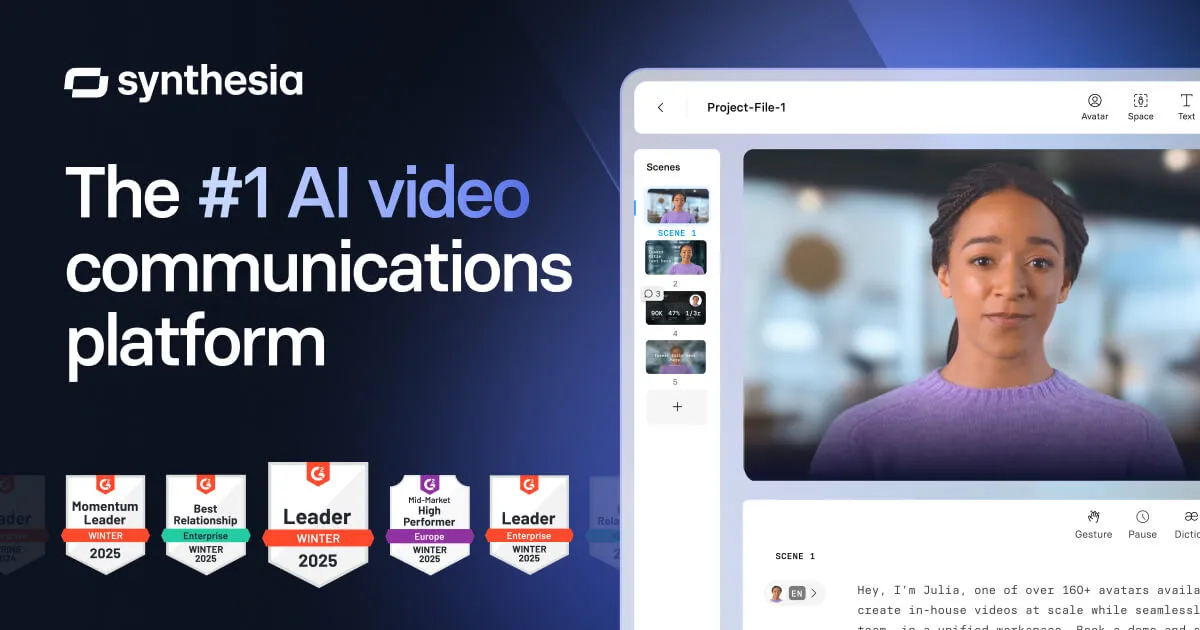
Source: Synthesia official site (synthesia.io)
Bottom line (up front): For avatar-based corporate or training video → Synthesia. For cinematic text-to-video generation → Runway or Google Veo. For repurposing blog/podcast content → Pictory. For talking-head creator videos → HeyGen. For script-based editing of recorded footage → Descript. Most teams need just one category — pick accordingly.
What makes an AI video generator worth using in 2026?
The category has matured enough that quality variation is now significant and visible. The best tools in each lane get four things right: output quality (does the avatar look natural? does the generated footage hold coherence over several seconds?), workflow fit (does the tool reduce steps in your actual production process or add them?), language and localization support (critical for global teams), and pricing transparency (can you predict monthly cost before you hit export?). Understanding which lane — avatar, generative, or repurposing — you actually need is the highest-leverage decision before evaluating any specific tool.
Full comparison table: top AI video generators in 2026
| Tool | Category | Free tier | Paid plans (approx.) | Avatars | Languages | Best for |
|---|---|---|---|---|---|---|
| Synthesia | Avatar video | Limited free plan | ~$18–$100+/mo | 230+ AI avatars | 140+ | Corporate training, L&D, explainers |
| HeyGen | Avatar video | Limited free | Paid tiers available | 100+ avatars | 40+ | Creators, sales videos, SMB |
| Runway | Generative video | Limited free | ~$12–$76/mo | No | — | Cinematic generation, creative production |
| Pictory | Content repurposing | Free trial | ~$19–$99/mo | No | Limited | Blog/podcast-to-video, social clips |
| Descript | Script-based editing | Free (limited) | ~$12–$24/mo | Overdub (voice) | English-primary | Podcast/video editing, screen recording |
| Google Veo | Generative video | Via Google AI | API/Workspace pricing | No | — | High-quality generative clips, enterprise |
| OpenAI Sora | Generative video | ChatGPT Plus/Pro | Bundled with ChatGPT | No | — | Creative, experimental video generation |
Prices and limits are approximate as of mid-2026. Verify current details on each provider’s official pricing page before subscribing — rates in this market change frequently.
Synthesia: the benchmark for avatar-based corporate video
Synthesia has established itself as the quality and integration leader for avatar-based video production (read our Synthesia review for a detailed breakdown). The platform allows you to type or paste a script, select from 230+ AI-rendered presenters, choose from 140+ languages and accents, and export a finished video — no camera, studio, or actor required. This workflow has made it the default tool for corporate L&D teams, compliance training, and global product explainers.
Key strengths:
- 230+ diverse AI avatars with natural lip sync and facial expression
- 140+ languages with automatic voice dubbing — a genuine advantage for global teams
- 200+ customizable video templates covering training, marketing, and onboarding formats
- Custom Avatar creation: train a digital twin of a real presenter from recorded footage
- Integrations with LMS platforms (Workday Learning, Cornerstone, iSpring) for enterprise L&D pipelines
- Brand Kit for locking fonts, colors, and logo placement across a team
Key limitations:
- Avatar video has a specific aesthetic — it works well for training and explainers, but is not suited to cinematic or narrative storytelling
- Advanced features (custom avatars, API, SSO) require higher-tier plans
- Free plan limits are modest — suitable for testing, not production volume
Best for: Corporate training, compliance video, product explainers, HR onboarding content, and any workflow where a speaking presenter is needed but filming is impractical or expensive.
HeyGen: strong avatar alternative for creators and SMBs
HeyGen is the most direct competitor to Synthesia in the avatar-video lane — see our HeyGen alternatives guide if you are weighing options in this space. It has grown rapidly and competes on avatar realism, pricing at entry tiers, and ease of use for individual creators and small teams. Its Talking Photo feature — animating a still photo to speak — is a notable differentiator for social and creator content. HeyGen also offers strong video translation capabilities for repurposing content across language markets.
Key strengths:
- Competitive avatar realism, particularly at lower price tiers
- Video Translation feature (lip-sync dubbing into 40+ languages) suited to repurposing existing footage
- Talking Photo: animate a still image to speak from a script
- More accessible pricing for individual creators than Synthesia’s enterprise-oriented tiers
Key limitations:
- Fewer enterprise integrations than Synthesia (LMS, SSO, compliance controls)
- Smaller template library for corporate workflow needs
- Custom avatar quality and terms vary — review carefully before creating an avatar of a real person
Best for: Individual creators, marketing agencies, and SMBs that need avatar video or video translation without an enterprise budget.
Runway: leading generative video for creative production
Runway (Gen-3 Alpha and newer models) is the most established tool in the generative video category — the lane where the model creates footage from a text prompt rather than presenting a scripted avatar. Its output ranges from abstract visual sequences to recognizable scenes, and it is widely used in professional creative production, music video work, and film pre-visualization. Runway also offers video-to-video transformation, inpainting, and camera control tools.
Key strengths:
- Gen-3 Alpha produces high-quality generative clips with coherent motion over several seconds
- Camera Control and Motion Brush for precise direction of generated footage
- Video-to-video transformation: apply style, motion, or composition changes to existing clips
- Established professional user base in film, advertising, and music video production
Key limitations:
- Generative video is not a replacement for avatar-based training or explainer workflows — different category entirely
- Free tier is limited; sustained creative use requires a paid plan
- Prompt engineering for consistent results has a learning curve
Best for: Creative professionals, filmmakers, music video directors, and marketers who need AI-generated footage for campaigns, trailers, or experimental content.
Pictory: repurposing existing content into video
Pictory addresses a specific, high-volume problem: you have long-form content (a blog post, a podcast transcript, a webinar recording) and need to convert it into short video clips quickly. It uses AI to identify key passages, match them with stock footage or uploaded media, and add captions — producing social-ready clips without manual editing. It is not a generative tool and does not create avatar presenters; its value is speed of content transformation.
Key strengths:
- Script-to-video and article-to-video workflows reduce production time significantly
- Auto-captioning and highlight extraction for social clips
- Large stock footage library integration
- Reasonable pricing for content marketing teams producing at volume
Key limitations:
- Output aesthetic depends heavily on stock footage quality — results are template-driven, not cinematic
- Not suited to original creative production, avatar video, or branded presenter content
- Language support is more limited than avatar-based tools
Best for: Content marketers, bloggers, podcasters, and social media teams who need to repurpose long-form content into short video consistently and at volume.
Descript: script-based editing for recorded video and podcasts
Descript sits at the intersection of video editing and AI — it transcribes your recorded footage, lets you edit video by editing the transcript text, and offers an Overdub voice correction feature. It is not a generative tool or an avatar tool; it is a workflow accelerator for teams that already record video or podcasts and need a faster path from raw footage to finished content.
Key strengths:
- Edit video by editing the transcript — removes the need for traditional timeline editing for dialogue-heavy content
- Screen recording built in for tutorial and demo content
- Overdub: correct words in a recording using an AI voice clone of the speaker
- Filler word and silence removal in one click
Key limitations:
- Requires source footage — it does not create video from scratch
- Primarily English-language workflow
- Overdub voice cloning requires recording a voice sample and has quality limits
Best for: Podcasters, YouTubers, course creators, and teams producing tutorial or screen-share content who want a faster editing workflow.
Google Veo and OpenAI Sora: high-capability generative video
Google Veo (available via Google AI Studio, Vertex AI, and Google Workspace integrations) and OpenAI Sora (available to ChatGPT Plus and Pro subscribers) represent the frontier of generative video quality in 2026. Both can produce detailed, physically coherent footage from text prompts at a level that exceeds earlier generative tools. Neither is suited to avatar-based training video or content repurposing — they are creative generation tools.
Google Veo key points:
- Strong physical realism and scene coherence for generated clips
- Enterprise access via Vertex AI; consumer access via Google AI Studio
- Integrated into Google Workspace video tools for business users
OpenAI Sora key points:
- Available as part of ChatGPT Plus/Pro subscription (as of mid-2026 — verify current access tiers)
- Strong prompt adherence and narrative scene generation
- Subject to content policies that limit certain categories of output
Best for: Creative teams, filmmakers, and marketers exploring AI-generated footage for campaigns, concept visualization, and experimental production.
Synthesia vs alternatives: which is right for your use case?
| Use case | Best pick | Why |
|---|---|---|
| Corporate training and L&D | Synthesia | 230+ avatars, LMS integrations, 140+ languages |
| Compliance and HR onboarding video | Synthesia | Brand controls, enterprise SSO, audit trail |
| Creator or SMB avatar video | HeyGen | Competitive pricing, strong at entry tiers |
| Video translation and dubbing | HeyGen | 40+ language lip-sync dubbing |
| Cinematic generative footage | Runway or Google Veo | Purpose-built for text-to-video generation |
| Repurposing blog or podcast content | Pictory | Script-to-video workflow, volume pricing |
| Editing recorded video/podcasts | Descript | Transcript-based editing, Overdub voice correction |
| Experimental AI video creation | OpenAI Sora | ChatGPT-integrated, strong prompt fidelity |
Which tool should you choose?
flowchart TD
  A[What type of video do you need?] --> B{Scripted presenter or avatar?}
  B -- Yes --> C{Enterprise or team use?}
  C -- Yes --> D[Synthesia]
  C -- No --> E[HeyGen]
  B -- No --> F{Repurpose existing content?}
  F -- Yes --> G[Pictory]
  F -- No --> H{Edit recorded footage?}
  H -- Yes --> I[Descript]
  H -- No --> J[Runway or Google Veo for generative video]
How to choose an AI video generator
Start with the category, not the feature list. If you need a scripted presenter to deliver your message in 20 languages without filming anyone, you are in the avatar-video lane — evaluate Synthesia and HeyGen. If you need original footage generated from a text prompt for a campaign or creative project, you are in the generative-video lane — evaluate Runway, Google Veo, or OpenAI Sora. If you have existing long-form content you need to slice into social clips, Pictory is purpose-built for that workflow. Most teams do not need to span categories.
Verify language support for your actual target languages. Synthesia’s 140+ language support is a major differentiator for global teams, but the quality varies by language. If LATAM Spanish, Japanese, or German is critical, test a representative script in that specific language before purchasing — do not rely solely on the supported-languages count.
Check commercial rights and output licensing before going to production. AI-generated video, including avatar video, is subject to each platform’s terms of use for commercial projects. Synthesia, HeyGen, and Pictory all grant commercial rights on paid plans, but restrictions vary by tier and use (e.g., broadcast use, resale). Read the licensing terms for your specific plan before publishing revenue-generating content.
Test with a realistic script sample, not a vendor demo. Corporate training video often involves technical terminology, product names, and specific pacing requirements. Test your actual content — including any specialized vocabulary — on the free plan before committing. Avatar lip sync quality on complex or technical scripts is a common differentiator that only shows up on your own material.
FAQ
What is the best AI video generator in 2026?
The best AI video generator depends on your use case. Synthesia leads for avatar-based training and corporate explainer videos, with a library of 230+ AI avatars and 140+ languages. Runway and Google Veo are the top picks for cinematic text-to-video generation. Pictory excels at repurposing blog posts and long-form content into short clips. HeyGen is a strong Synthesia alternative for talking-head videos. Most teams pick based on whether they need avatar video, cinematic generation, or content repurposing — the categories barely overlap.
Is Synthesia free to use?
Synthesia offers a free plan that allows you to create a limited number of videos per month using its AI avatar library. Paid plans unlock more video minutes, additional avatars, custom avatar creation, and branding controls. Check synthesia.io/pricing for current tiers and limits, as these change periodically.
What is the difference between Synthesia and HeyGen?
Both tools create talking-head avatar videos from a script — see our Synthesia vs HeyGen comparison for a full feature breakdown. Synthesia has a larger enterprise customer base, deeper LMS and corporate workflow integrations, and a more established template library. HeyGen has grown quickly and is often noted for competitive pricing and strong avatar realism at lower plan tiers. For individual creators and small teams, HeyGen is a credible lower-cost alternative; for enterprise L&D and compliance workflows, Synthesia’s integrations give it an edge.
Can AI video generators create realistic human avatars?
Yes, tools like Synthesia, HeyGen, and D-ID generate videos featuring AI-rendered human presenters reading a script. Avatar quality has improved significantly — top-tier tools now produce natural lip sync and subtle facial expressions. Custom avatar creation (training on footage of a real person) is available on higher-tier plans from both Synthesia and HeyGen. The result is a realistic digital twin that can present new scripts without filming. Always verify the platform’s terms and consent requirements before creating a custom avatar of a real person.
How much do AI video generators cost?
Pricing varies widely by category. Avatar-based tools like Synthesia typically start around $18–$30/month for entry plans and rise to $100+/month for business tiers. Runway’s creative generation plans start around $12–$15/month. Pictory starts around $19/month. Google Veo and OpenAI Sora have API or subscription access with different pricing models — check the vendor sites directly as rates change. Most tools offer a free tier or trial. Pricing verified June 2026 — verify on the vendor’s site before purchasing.
Pricing verified June 2026 — check vendor pages before purchasing. Based on publicly available information from each provider’s official website, pricing pages, and documentation as of June 2026. Feature assessments reference published product documentation and third-party comparisons rather than in-house proprietary testing. Last updated: June 24, 2026. Contains affiliate links (disclosure policy).