Synthesia Review 2026: AI Avatar Video Generator for Corporate and Training Use
(更新: )
Synthesia is the market-leading AI avatar video platform for corporate training, onboarding, and multilingual explainer content — it consistently leads our best AI avatar generators roundup for enterprise use. It lets you turn a typed script into a finished video — complete with a realistic AI presenter — in minutes, with no camera, studio, or actor required. It is the right tool for L&D teams and global communicators; it is not designed for cinematic generation or recorded-footage editing. Here is an honest assessment of what it does well and where it falls short.
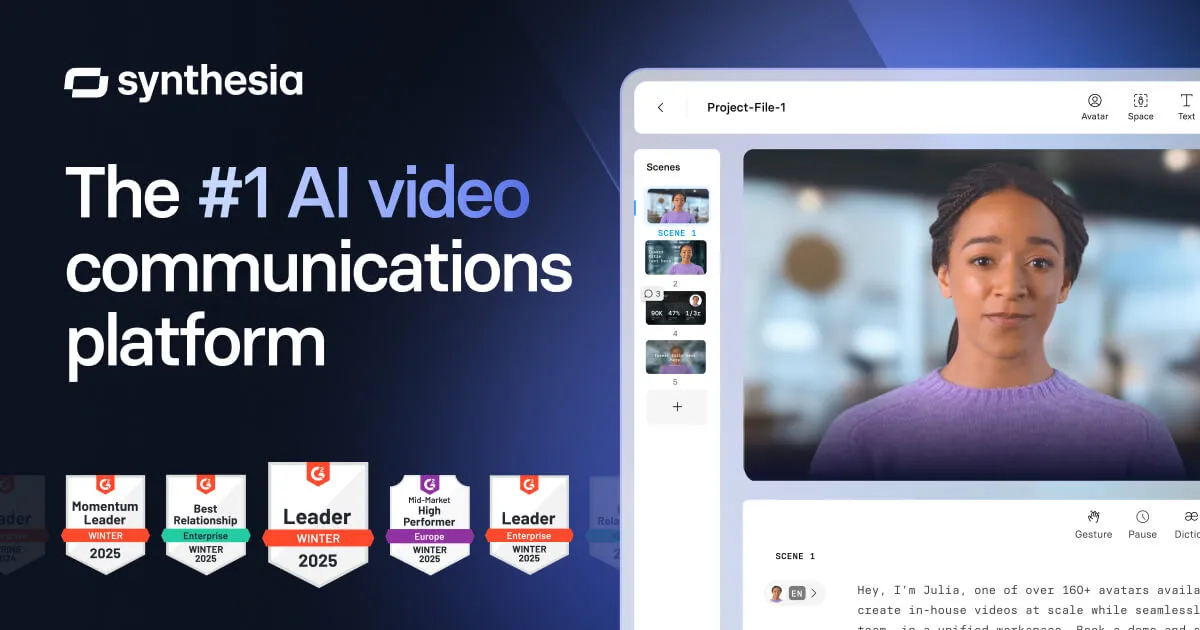
Source: Synthesia official site (synthesia.io)
Overall Rating: 4.4 / 5
| Criterion | Rating |
|---|---|
| Avatar quality | ★★★★★ |
| Language support | ★★★★★ |
| Templates and workflow | ★★★★☆ |
| Pricing transparency | ★★★☆☆ |
| Enterprise integrations | ★★★★★ |
| Value for individuals / SMBs | ★★★☆☆ |
What is Synthesia?
Synthesia is an AI video platform built around one core workflow: you write a script, pick an AI avatar from a library of 230+ diverse digital presenters, choose a language and accent from 140+ options, and export a video. The avatar delivers your script with synchronized lip movement and natural facial expression — no filming, no voice recording, no editing timeline required.
The platform targets corporate buyers: L&D departments, compliance and HR teams, and internal communications teams who need to produce consistent, multilingual video at scale without production overhead. Its integrations with enterprise LMS platforms — Workday Learning, Cornerstone, iSpring — reflect this orientation. It is not a tool for YouTube creators, filmmakers, or content marketers who need cinematic output.
Key features
230+ AI avatars
Synthesia’s avatar library is one of the largest in the avatar-video category. Avatars span a range of ages, ethnicities, and presentation styles — business casual, formal, and casual — making it practical to find a presenter that fits a given video’s context. Avatar quality has improved significantly in recent product releases: lip sync is natural, and subtle facial expressions — occasional blinks, slight head movement — help reduce the uncanny-valley effect common in earlier AI avatar tools.
140+ languages with voice dubbing
The multilingual support is Synthesia’s strongest competitive moat. Selecting a different language doesn’t just swap the audio track — the avatar’s lip movements resync to the new language’s phonemes. This means you can produce the same training video in English, Spanish, German, and Japanese without any additional recording or manual lip-sync work. For global teams producing localized onboarding or compliance content, this capability alone justifies the platform.
Language quality is not uniform across all 140+: English, Spanish, French, German, and Portuguese tend to be strongest. If your target language is less commonly used, test a representative script on the free plan before committing to a paid subscription.
200+ customizable templates
Synthesia provides templates across training, marketing, onboarding, and explainer formats. Templates pre-structure scene layouts, lower-thirds, and transition styles — reducing setup time for common video types. Teams can apply a Brand Kit (fonts, colors, logo placement) across all videos so output stays consistent without per-project manual styling.
Custom Avatar creation
Higher-tier plans allow you to create a Personal Avatar or Studio Avatar — a digital twin trained on footage of a real person (yourself or a designated presenter). Once created, this avatar can deliver any new script without additional filming. This is valuable for executives, trainers, or brand spokespeople who want to appear consistently across video content without scheduling recurring shoots. Synthesia requires explicit consent from the subject and enforces this through a verification step during creation.
Enterprise and LMS integrations
Synthesia integrates with Workday Learning, Cornerstone OnDemand, and iSpring — three of the most widely deployed enterprise LMS platforms — enabling teams to publish video directly into their existing training workflows. API access (on Business and Enterprise plans) supports custom integrations and automated video generation pipelines. SSO and team management features support large-scale deployment with centralized access control.
How much does Synthesia cost?
| Plan | Approximate price | What’s included |
|---|---|---|
| Free | $0 | Limited videos/month, access to subset of avatars and templates |
| Starter | ~$18–$30/month | More video minutes, full avatar library, 140+ languages |
| Creator | Higher tier | Custom avatar, more video exports, priority rendering |
| Business | ~$100+/month | API access, team features, Brand Kit, LMS integrations |
| Enterprise | Custom pricing | SSO, SLA, advanced compliance controls, dedicated support |
Pricing as of mid-2026 — verify exact tiers, video minute limits, and per-seat vs. flat pricing at synthesia.io/pricing before purchasing. Synthesia’s pricing structure has changed multiple times; the table above reflects general market positioning, not guaranteed current rates.
The free plan is useful for evaluating avatar quality and workflow but is not suitable for production volume. Teams with real output needs will require at minimum a Starter plan; enterprise features require Business or above.
Pros and cons
| Pros | Cons |
|---|---|
| Largest avatar library in the category (230+) | Higher entry price than some alternatives for individuals |
| 140+ languages with real lip-sync dubbing | Free plan is very limited for production use |
| Strong LMS and enterprise integrations | Not designed for cinematic or generative video |
| Custom avatar creation on paid plans | Advanced features gated behind higher tiers |
| Consistent quality across template-based videos | Avatar aesthetic not suitable for all brand styles |
| Brand Kit for team-wide visual consistency | Pricing structure can be opaque; verify before buying |
Is Synthesia worth it?
For corporate L&D and compliance teams: yes. If your primary need is scripted, presenter-led video that needs to be available in multiple languages across an LMS — Synthesia is the most complete solution in this category. The combination of avatar quality, language coverage, and LMS integrations is difficult to replicate with other tools or traditional production workflows.
For individual creators and small teams: it depends. The per-seat pricing and feature gating make Synthesia less cost-efficient for individuals or small agencies than alternatives like HeyGen. If you need high-quality avatar video at lower volume, HeyGen warrants comparison before committing.
For cinematic or generative video: no. Synthesia produces avatar-based scripted video — a distinct category from text-to-video generative tools like Runway or Google Veo, all of which are covered in our AI video generators comparison. If you need footage generated from a text prompt rather than a scripted presenter, Synthesia is the wrong tool.
Is Synthesia right for you?
Synthesia vs alternatives
| Use case | Best pick | Why |
|---|---|---|
| Corporate L&D, compliance video | Synthesia | 230+ avatars, LMS integrations, 140+ languages |
| Creator or SMB avatar video | HeyGen | Competitive at lower tiers, strong video translation |
| Enterprise avatar with compliance controls | Synthesia or Colossyan | Both offer SSO, audit features, and enterprise plans |
| Script-based editing of recorded footage | Descript | Transcript editing, Overdub voice correction |
| Cinematic text-to-video generation | Runway or Google Veo | Purpose-built generative video, not avatar-based |
Synthesia vs HeyGen: The most common direct comparison — for a full feature breakdown, see our Synthesia vs HeyGen guide. Synthesia leads on language count (140+ vs 40+), LMS integrations, and enterprise feature depth. HeyGen competes on avatar realism at entry-tier pricing and appeals to creators and SMBs. For enterprise buyers, Synthesia is the safer default; for individual or small-team use, HeyGen offers strong value at lower cost.
Synthesia vs Colossyan: Colossyan is a lesser-known competitor also targeting enterprise L&D, with a similar avatar-and-script workflow and compliance-oriented features. For most buyers Synthesia has the larger avatar library, more mature integrations, and wider market adoption — but Colossyan is worth evaluating if you want to compare enterprise pricing.
Synthesia vs Descript: Different categories. Descript is a transcript-based video editor for teams that already have recorded footage. It doesn’t create avatar video. If you have existing recordings and want a faster editing workflow, Descript is the right tool; if you want to generate presenter video without filming, Synthesia is.
Who should use Synthesia?
- L&D and corporate training teams producing onboarding, compliance, or product training videos that need to scale across languages and territories
- Internal communications teams that need consistent, presenter-led video without scheduling video shoots
- HR teams that need localized onboarding videos across regional offices
- Global companies distributing the same content in 5+ languages — where automatic lip-sync dubbing reduces production time significantly
- Agencies or consultants producing training video for enterprise clients with LMS delivery requirements
It is a poor fit for YouTubers, creative agencies needing cinematic output, podcasters, or solo creators working with recorded footage.
Bottom line
Synthesia is the strongest platform in the AI avatar video category for corporate and enterprise use. Its combination of avatar breadth, multilingual lip-sync dubbing, template-based workflow, and LMS integrations has made it the default tool for L&D and compliance teams globally. The pricing is enterprise-oriented — individuals and small teams will find better value elsewhere — but for organizations producing training or explainer video at scale across languages, it is difficult to find a direct equivalent.
Start with the free plan to test avatar quality against your actual scripts, particularly in your target languages. Upgrade to a paid tier when the output quality and workflow justify the cost.
Pricing verified June 2026 — check the vendor page before purchasing. Feature information based on Synthesia’s publicly available product documentation and pricing pages as of June 2026. This article contains affiliate links. See our disclosure policy.